Identities
The Identities page allows you to search for players who have connected to FiniAC protected servers and investigate potential ban evaders, account sharers, and cheaters. The system tracks all available identifier types and automatically links accounts that share common identifiers.
Searching for Players
FiniAC supports searching by various identifier types.
- Player UID (License): 40-character alphanumeric identifier (e.g.,
license:1234567890abcdef1234567890abcdef12345678)- FiniAC uses this as the primary identifier for FiveM players
- License is linked to the player's Rockstar account
- Discord ID: 18-digit number (e.g.,
123456789012345678) - Steam ID: Steam Hex IDs for FiveM, SteamID64 for Arma 3
- Cfx ID: Cfx/FiveM ID
- Live ID: Microsoft Live ID/PUID
- XblID: Xbox Live ID
- IP Address: Standard IPv4 format (e.g.,
192.168.1.100) - Player Name: Any text that doesn't match above formats
Keyboard Shortcut
Press / to quickly focus the search bar from anywhere on the page.
Alias Account Search
To find all alias accounts linked to a player, use the Alias Search feature:
- Search for any identifier (player UID, Discord ID, etc.)
- Click the magnifying glass icon on the player card
- The system will find all accounts sharing identifiers with that player
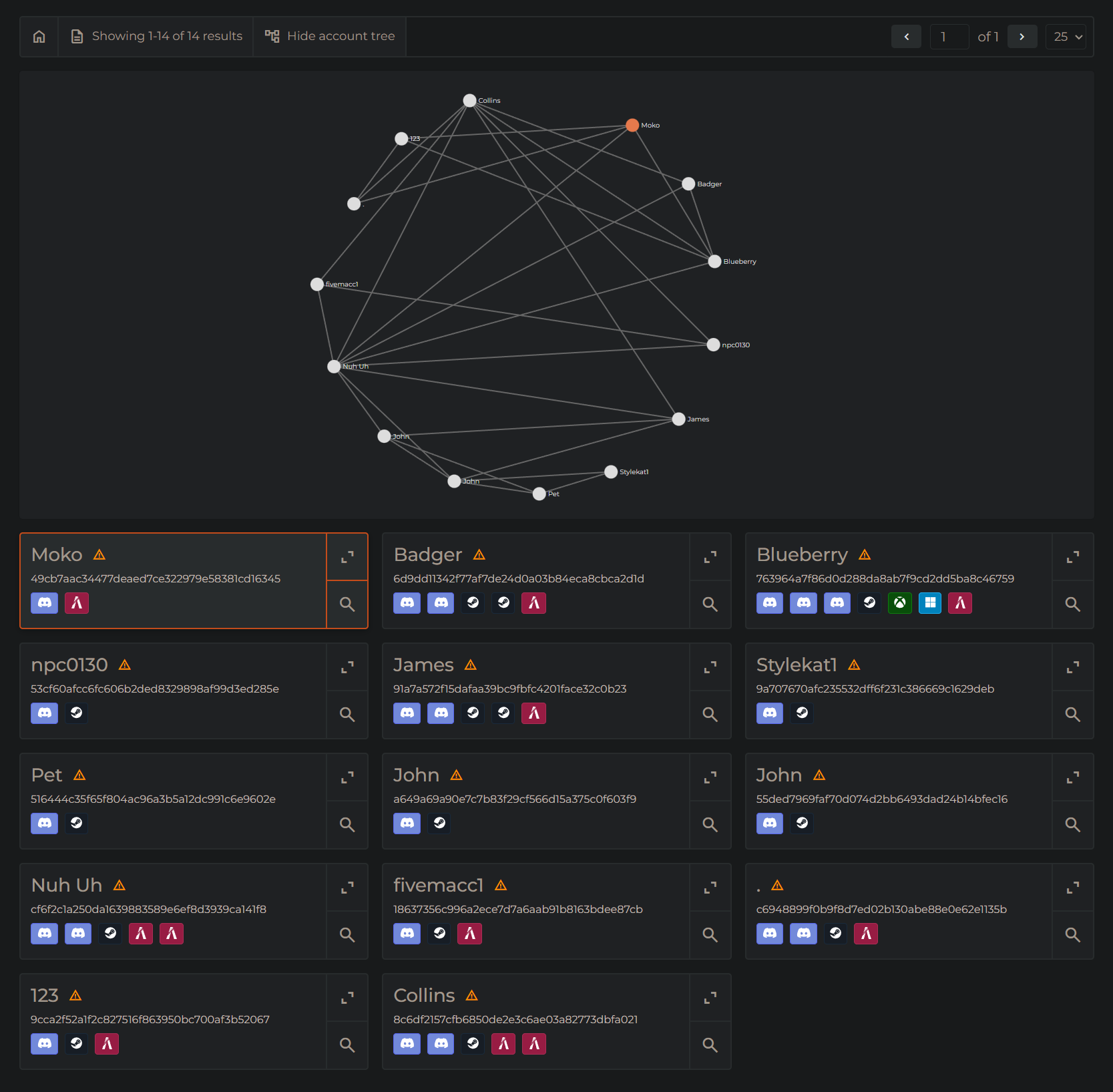
The alias search uses FiniAC's advanced recursive account matching system, which analyzes all
- all available identifier types
- all known player names
- all known IP addresses
- all known hardware identifiers
The matched accounts can be viewed visually using the Account Tree.
Performance Notice
The account tree may be slow if there are more than 500 alias accounts found.
Use Cases
Investigating Alias Account Bans
- Search for a banned player's license
- Click the magnifying glass to find alias accounts
- Review why these accounts are linked
- If you believe an account should be unbanned review our documentation on unbanning alias accounts
Find Players Sharing Accounts
Multiple players may share, for example, Discord accounts to receive paid VIP benefits. You can use the alias search to find these players.
- Search for a player's Discord ID
- Perform alias search
- Look for accounts that share the same Discord ID, but no other identifiers such as Hardware IDs
Integration with Other Features
Player Profile
By clicking on the three dots in the top corner of a player's profile card and selecting "View in identities", you will be navigated to the Identities page where an alias search is performed. This option is available directly from the Threats, Apollo, Whitelist, and Logs pages.
API
Use the Identity Match API to programmatically search for players and retrieve account links.
Troubleshooting
No Results Found
Issue: Search returns no results
Solutions:
- Verify that the identifier is correct
- Try a different identifier type
- Check if the player has connected to your server within the last 30 days
- Ensure FiniAC resource is active when the player connected